+971 50 634 3878 Sharjah, Dubai info@lifeguarddatarecovery.com

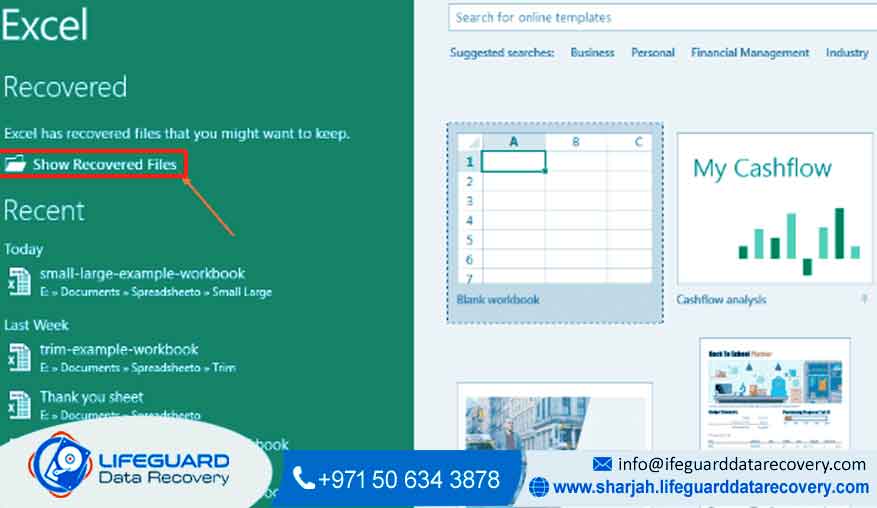
Excel file recovery
Expert Excel File Recovery Dubai: Instantly Restore Your Corrupted Spreadsheet Data. The sudden, awful feeling of losing critical financial models, project schedules, or years of important business information trapped inside a broken Excel file can bring everything to a stop.
And please don’t take a risk with those unreliable tools you find online; they can cause permanent data loss. Our certified Lifeguard data recovery engineers specialize in complex Excel file recovery right here in Dubai and across the UAE. We offer a fast, safe, and expert solution.
We operate with world-class security and a clear No Data, No Fee promise, making sure you get your essential spreadsheet data back quickly and privately.
Get Your Free, Private Look-Over Today
Why Trust Us for Your Corrupted Excel File Repair?
Choosing the right partner to fix your broken Excel file is the most important decision that will decide the fate of your lost information. We truly understand that your Excel workbooks contain the lifeblood of your business-everything from complex pivot tables and VLOOKUP formulas to essential client records.
Our special focus on fixing internal logical failures, especially those inside Microsoft Office files, makes us different from regular data recovery companies. We don’t just bring the file back; we work hard to restore its integrity, including all the charts, macros, and embedded objects. This is true data recovery for your most critical spreadsheets.
Our commitment to expertise, security, and a relentless pursuit of the highest possible recovery rate has made us the trusted source for individuals and large companies in the UAE. When you see that crippling ‘file is corrupted and cannot be opened’ error, you need more than just promises-you need proven results. We back our service with clear performance metrics and absolute adherence to global data security rules.
Unmatched Expertise and Reliability
99.9% Success Rate: Our special in-house tools and certified team consistently achieve a near-perfect success rate in recovering lost spreadsheet data from logically damaged media or severely corrupted files. This number is for cases where the storage drive itself is fine.
ISO 27001 Certified Security: Data security is our highest priority. Our cleanroom labs and processes follow the strict ISO 27001 standard for Information Security, making sure your confidential financial and business data is handled with the highest level of privacy and integrity during the entire Excel data recovery job.
24/7 Emergency Service: Data loss doesn’t wait for business hours. We offer support around the clock and emergency evaluation services across Dubai, Abu Dhabi, and Sharjah, minimizing your downtime. Our rapid response team can start the recovery process almost immediately.
Certified Engineers: Our recovery experts are trained and certified in the latest data repair methods. They have decades of collective experience tackling everything from simple deleted files to highly complex, multi-gigabyte files with intricate internal structures. We are the experts you call when all other options have failed.
Comprehensive Excel File Recovery Services
Our specialized services cover every kind of data loss problem related to Microsoft Excel workbooks, meaning we have a solution for every type of file damage. Whether you have a standard .xlsx file, an older .xls format, or a macro-enabled workbook, our process is designed for maximum data extraction and structural repair. We handle all versions of Excel.
Corrupted and Damaged File Repair
This is our core specialty. We use advanced techniques to rebuild the internal XML structure of your damaged Excel workbook. This is vital when you see errors like “Excel found unreadable content” or the file simply won’t open. We fix damage caused by software bugs, sudden computer shutdowns, and operating system errors. We focus on saving all parts, including:
Worksheet Data: Restoring all numerical data, text, and critical formulas.
Visual Components: Getting back embedded charts, graphs, and images.
VBA and Macros: Making sure complex functions and custom scripts are preserved.
Links and Pivot Tables: Re-establishing external data links and complex data models.
Accidental Deletion and Formatting Recovery
Even after you’ve emptied the Recycle Bin or permanently deleted a file, the data often remains on the physical storage media. Our retrieval techniques can look past the operating system and directly pull out the raw data blocks that make up your spreadsheet. We perform deep scans on hard drives (HDD), solid-state drives (SSD), and external storage to find every fragment of your deleted spreadsheet data.
Recovery from Failing or Corrupted Storage Media
Sometimes, the Excel file being broken is just a symptom of a larger problem: a failing hard drive, a corrupted flash drive, or a malfunctioning RAID system. In these cases, fixing the file alone is not enough. We recover the file directly within our ISO-certified Cleanroom environment. By fixing the physical drive first, we can secure a clean copy of the file structure, which is then fixed and verified by our logical recovery team.
Password and Encryption Issues
If you’ve forgotten a password to open a workbook or can’t unprotect a sheet, our specialists can often help you get your critical data back. We use special, authorized methods to address both file-level and worksheet-level password protections, making sure you can unlock your valuable Excel files.
Our Professional Excel File Recovery Process
Clarity and security are our top priorities. Our proven four-step process ensures fast, safe, and reliable Excel file recovery, giving you complete peace of mind from the moment you contact us.
Free Evaluation and Diagnosis
You may visit our secure Dubai service center or request a free, protected pickup anywhere in the UAE. Our engineers examine the corrupted Excel file to identify the exact cause—whether software-related, storage damage, or logical corruption. You receive a clear diagnosis report, a fixed price quote, and an estimated recovery time at no cost.
Secure Laboratory Recovery
After approval, recovery begins in our certified secure laboratory. For physical storage issues, data extraction is performed in a Class 100 Cleanroom. For logical corruption, our specialists use proprietary in-house tools to analyze and repair the Excel file structure at a deep level, ensuring maximum recovery accuracy.
Data Verification and Quality Check
Recovered files undergo strict quality checks before delivery. You receive a file list and a secure preview of the restored Excel workbook to confirm that sheets, formulas, and data tables are fully intact. This verification step supports our No Data, No Fee guarantee.
Secure Data Return
Once verified, your Excel files are delivered via encrypted transfer or secure storage media. All temporary data is permanently erased from our systems, ensuring full confidentiality and complete data privacy.
.
Issues We Fix: Beyond Simple Excel Errors
The error message that pops up on your screen is often just the beginning. Our deep expertise allows us to fix the real underlying causes that lead to the corruption of your vital Excel files.
Common Causes of Excel File Corruption We Resolve
Improper Shutdowns or Power Surges: A sudden power cut while Excel is saving is the most common reason for a broken file. We can often join the fragmented pieces of data on the disk to rebuild the complete file structure.
Operating System and Software Conflicts: Errors within your Windows or macOS file system, unexpected app crashes, or bad add-ins can quietly damage the file structure, making it impossible to open the workbook.
Storage Media Bad Sectors: When your hard drive gets ‘bad sectors,’ the physical location holding part of your Excel file becomes unreadable. Our lab tools can carefully read past these broken areas and rebuild the missing data.
Virus and Malware Attacks: Ransomware and other types of malware are made to break or encrypt files. Our specialists have proven methods for working with these files to get the original, usable data out.
Oversized or Complex Files: Extremely large Excel files (those pushing the limits) or files with many macros are prone to instability. We are experts at manually stabilizing these complex structures to make the data accessible again.
Real-World Scenarios We Solve
Financial Firm’s Quarterly Report: A critical, macro-heavy budget spreadsheet suddenly refused to open the night before a board meeting. Our Solution: Emergency logical repair was performed, recovering 15 complex sheets, pivot tables, and VBA code within 12 hours.
Engineering Company’s Project Schedule: A USB drive containing the master project plan was accidentally unplugged during a save, resulting in a damaged workbook. Our Solution: We recovered the file and the latest Gantt chart data directly from the flash drive’s physical storage sectors.
Individual’s Thesis Data: Years of scientific research data were lost when the laptop’s hard drive failed. Our Solution: We recovered the data from the physically damaged hard drive in our Cleanroom and returned the complete, uncorrupted file.
Costs and Pricing Insight: Transparent Data Recovery
We believe in transparent pricing and clear value for our expert services. Data recovery is a specialist forensic service, and our pricing model reflects the expertise, certified security, and special technology needed to achieve the highest success rates, all backed by our strict No Data, No Fee guarantee.
Our No-Risk Guarantee
The main point of our customer promise is our “No Data, No Fee” policy. If our engineers are unable to recover the essential data from your damaged Excel workbook that you asked for and verified, you will not be charged the recovery fee. This guarantee shows our confidence in our technology and expert team.
Helpful Advice: Prevention and DIY Tips
While we are here 24/7 for expert help, we want to help you prevent future data loss. Trying certain DIY solutions can sometimes cause further, irreparable damage. Follow these professional guidelines to maximize your chances of a full recovery.
Immediate Action Checklist (What to Do Right Now)
- Stop Working Immediately: If you get an error, STOP using the computer or external drive right away. Any further saving of data can permanently destroy the fragmented pieces of your file, making professional recovery impossible.
- Do Not Run Disk Check Utilities: Tools like CHKDSK are made to “repair” the file system, which often involves deleting the corrupted file fragments—the exact data we need to recover.
- Create a Copy (Safely): If the file is on a healthy, accessible hard drive, copy the damaged file to another drive/location without trying to open or save it. If it’s on a failing drive, do not attempt to copy, as this can cause the drive to fail.
- Avoid Unverified Software: Do not download and run unverified “free” Excel file repair software. These programs are rarely effective and can often damage the file’s internal structure even more.
- Contact Professionals: If the quick fixes below fail, your safest and most reliable next step is to contact a professional data recovery center in the UAE like ours for a free evaluation.
Quick Fixes to Try (Low-Risk)
Microsoft provides a built-in feature that can sometimes repair minor corruption. This is the only DIY step we recommend before professional intervention:
Use the “Open and Repair” Feature: In Excel, go to File Open. In the dialog box, select your corrupted file, but instead of clicking ‘Open’, click the arrow next to the Open button and select ‘Open and Repair ‘. Choose ‘Repair’ first. If that fails, try ‘Extract Data.’
Open in Safe Mode: Try opening Excel in Safe Mode (hold the Ctrl key while launching the application), then try opening the file. This often bypasses add-ins that might be causing the corruption.
Why We’re Best for Excel File Recovery in the UAE
We are not just a simple IT service; we are a dedicated, specialist data forensics laboratory. For critical business and personal data trapped in a corrupted Excel file, our combination of certified security, advanced technology, and local presence in the UAE ensures the best possible outcome.
Unique Value Proposition
Proprietary File System Tools: Our engineers use exclusive, in-house tools specifically made for deeply analyzing and reconstructing the complex structure of modern XLSX files. These tools go far beyond what commercial software can achieve.
Local UAE Cleanroom Facility: Unlike companies that ship your device internationally, our state-of-the-art, ISO-certified Cleanroom lab is centrally located to serve Dubai, Abu Dhabi, and Sharjah directly. This cuts down the time needed and ensures your data never leaves the country.
End-to-End Confidentiality: We are trusted by financial institutions, government entities, and major corporations. Our engineers are trained in the strictest data privacy protocols, and our entire process is designed to handle your sensitive information with maximum security and discretion.
Case Studies and Success Stories
The true measure of a data recovery service is its track record.
Case Study: The Investment Bank’s Critical Model
A leading investment bank in the DIFC had a catastrophic server failure that resulted in their most critical Q4 financial modeling Excel file becoming a 0-byte, unopenable file.
The Problem: Severe, logical damage to a large XLSX file stored on a server drive due to a controller failure. The file appeared whole but was structurally empty.
Our Solution: Our engineers ran a sector-by-sector analysis of the raw data. They identified the header and footer blocks and successfully rebuilt the entire internal structure.
The Result: 100% of the spreadsheet data, including all formulas and complex macros, was recovered and verified. The bank was able to submit its report on time.
Testimonial: Local SME Financial Controller
Our main accounting spreadsheet became ‘unreadable’ right at tax time. We thought weeks of work were lost. Your team at the Dubai center picked up the laptop, diagnosed the corrupted Excel file for free, and had the complete, repaired file back to us by the next morning. The No Data, No Fee guarantee gave us confidence, and the speed of the Excel file recovery saved our entire operation. Truly professional service.
Frequently Asked Questions (FAQs)
Here are the most common questions our clients ask when they are worried about a corrupted Excel file.
Q: Can you recover my Excel file if I already tried a free software tool and it failed?
A: Yes, in many cases, we still can. While failed attempts with unverified software can sometimes cause more damage, our advanced forensic tools can often extract data from a partially corrupted file. However, you must stop all attempts immediately and bring the file to us. The success rate decreases with every failed attempt, you see.
Q: What is the turnaround time for a typical Excel file recovery in Dubai?
A: For typical logical Excel file corruption (a healthy hard drive but a broken file structure), the recovery usually takes 1 to 3 business days after the free check is complete. For emergency cases or if the corruption is severe, we offer an expedited service that can provide results in as little as 8 to 24 hours.
Q: Is my sensitive financial and business data secure and confidential during the recovery process?
A: Absolutely. Data confidentiality is our highest priority. Our facility and process are ISO 27001 certified, meaning we follow strict international rules for information security. All recovery work is done on secure, isolated networks, and your data is handled with the utmost discretion from start to finish.
Q: Do I need to bring my whole computer or just the corrupted Excel file?
A: If the file is on a healthy, external drive, you can provide us with a secure copy of the damaged Excel workbook. However, if the corruption is caused by an underlying hard drive issue, bringing in the entire storage device is the safest option. For local clients, we offer a free pickup service in Dubai, Abu Dhabi, and Sharjah to ensure the device is transported safely.
Contact Us and Start Your Recovery Today
Don’t let a corrupted Excel file derail your business or jeopardize your crucial personal records. The window for a successful and complete Excel data recovery is often short. Act now to secure your critical spreadsheet data.
Contact our certified data recovery specialists today for a free, no-obligation evaluation of your damaged workbook. We are ready to provide the rapid, secure, and expert service you need to get back to work.
Primary Call-to-Action (CTA):
Call Us Now for a Free Evaluation: Get Your Corrupted Excel File Back!

Contact us : +971 50 634 3878