+971 50 634 3878 Sharjah, Dubai [email protected]

Can RAID Data Be Recovered Without Backup?
It is one of the most stressful notifications a sysadmin or home lab enthusiast can receive: a degraded array, multiple blinking amber lights, or a storage volume that suddenly reads “RAW” or Lifeguard Data Recovery “Uninitialized.” When you realize your backup system hasn’t run successfully in months, panic sets in.
If you are asking yourself, “Can RAID data be recovered without a backup?” the short answer is yes, in many cases, it is technically possible. However, your immediate actions from this point forward will determine whether you successfully restore your files or permanently destroy them.
This comprehensive guide breaks down the physical and logical realities of recovering RAID data without a backup, analyzes your recovery options based on different RAID levels, and outlines a risk-free, step-by-step roadmap to get your data back safely. Lifeguard data recovery
Is RAID Data Recovery Possible Without Backup?
Yes, it is possible because of how RAID (Redundant Array of Independent Disks) architectures distribute data. When a RAID array fails or drops offline, the actual files (your databases, documents, and system configurations) usually remain completely intact across the individual physical disk platters or flash memory blocks.
What has actually broken is the metadata structural map. The RAID controller or operating system can no longer determine the correct block sizes, disk sequencing, or parity rules required to stitch those stripes of data back into readable files.
By using virtual reconstruction techniques, experts can bypass the failed controller or hardware, logically realign the data stripes, and extract the intact files onto an entirely separate external drive.
Critical Distinction: RAID is designed for high availability (keeping your systems running if a drive dies), not for data protection. It does not protect you from accidental deletions, ransomware, formatting errors, or catastrophic multi-drive mechanical failures.
The Crucial Difference: Which RAID Levels Can Be Recovered?
The absolute recovery success rate of your system depends heavily on your specific RAID level configuration. Some levels offer built-in margins of safety, while others have zero tolerance for error.
Can RAID 0 Data Be Recovered Without Backup?
Recovery Viability: Extremely Difficult / Professional Help Recommended
RAID 0 utilizes “striping” to split data evenly across two or more disks to maximize performance. It offers zero redundancy. If even a single drive fails in a RAID 0 array, the entire file system breaks, as half of every single file’s code resides on the dead drive.
Can you recover it? Yes, but you must physically clone every single sector of all drives. If one drive has mechanical damage, it must go to a cleanroom to be temporarily restored so a clone can be made. The recovery software can then attempt to interleave the virtual disk images back together.
Can RAID 5 Data Be Recovered After Failure?
Recovery Viability: High (if caught early) / Risky (during rebuilds)
RAID 5 is one of the most common configurations, striping both data and distributed parity across three or more drives. It can comfortably survive the failure of one physical drive without losing data.
Can you recover it without a backup? Yes. However, if a second drive fails before the first one is replaced and rebuilt, the array will collapse. Attempting to rebuild a degraded RAID 5 array is highly risky because the intense read stress on the remaining older drives often triggers an Unrecoverable Read Error (URE) or a second drive failure, corrupting the entire pool.
RAID 1, RAID 6, and RAID 10 Viability
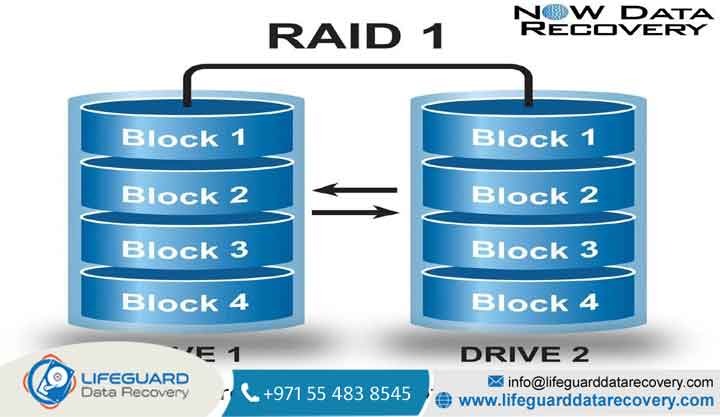
RAID 1 (Mirroring): Has the easiest recovery path. Because data is mirrored exactly 1-to-1 on another disk, you can usually take a single surviving drive, plug it into a separate machine using a SATA-to-USB adapter, and read the partition directly using simple file recovery tools.
RAID 6 (Dual Parity): Can survive the simultaneous failure of up to two drives. Recovery is highly successful unless three or more disks have suffered physical failure.
RAID 10 (Nested Array): Combines mirroring (RAID 1) and striping (RAID 0). Recovery success depends on which drives failed. You can survive multiple drive losses as long as they do not belong to the exact same mirrored sub-array.
What Causes RAID Data Loss? (And Why Arrays Fail)
Understanding the exact event that took your array offline is crucial. Applying the wrong fix to a hardware issue can permanently destroy your data.
1. Logical Corruption and Accidental Deletion
In this scenario, your hardware (the drives and the RAID controller) is fully healthy, but the file system structure has been damaged. This is commonly caused by:
2. RAID Controller Failure vs. Drive Failure
Controller Failure: The physical card or onboard motherboard controller chip that manages the array fails. The drives are completely fine, but the system cannot access them because the “orchestrator” is gone.
Drive Failure: One or more physical disks inside the array experience head crashes, spindle motor failures, or bad sectors, preventing the array from mounting.
3. The “Silent Killer”: Unrecoverable Read Errors (URE)
An Unrecoverable Read Error occurs when a drive encounters a physical sector it simply cannot read. On a healthy array, the controller reconstructs the missing sector on-the-fly using parity. However, if your array is already degraded (one drive is down) and you begin a rebuild, a single URE on any of the surviving drives will cause the rebuild to fail and can instantly corrupt the entire array.
Critical Warning: What NOT to Do When a RAID Array Fails
Most permanent data loss on RAID systems is not caused by the initial failure. It is caused by frantic, panicked DIY rescue attempts. If you do not have a backup, strictly avoid these destructive actions:
DO NOT force a failed drive back online: If a disk was kicked out of the array by the controller, it was for a reason. Forcing it back online will write corrupt metadata back to the partition table.
DO NOT run CHKDSK or FSCK: These built-in OS utilities are designed to fix file systems, not RAID arrays. They do this by aggressively deleting “corrupted” indices, which can permanently wipe out fragments of recoverable files across a broken striped array.
DO NOT initialize or reformat the array: If your NAS or server prompts you to “Initialize disk” or “Format volume to use it,” click Cancel immediately. This wipes out the metadata tables that hold the stripe sequence.
DO NOT swap the physical drive order: The physical slot sequence of your hard drives matches the configuration metadata. Swapping Disk 3 into Disk 1’s slot and booting up can overwrite the array configuration blocks.
How to Recover RAID Data Without Backup: A Safe Technical Approach
If your drives are physically healthy (no clicking, grinding, or detection errors) and you have determined the issue is a logical error or a failed hardware controller, you can attempt safe recovery.
The primary rule of safe recovery is: Never perform recovery steps on the live, original drives. You must work entirely on virtual, sector-by-sector clones.
When to Bypass DIY and Contact Professional RAID Data Recovery Services
If your business relies on this data, or if you suspect physical drive failure, DIY attempts are an unacceptable risk. If you keep powering on a physically damaged drive, the mechanical read/write head can scratch the physical platters, turning your data into unrecoverable dust.
To protect your assets, search for local, certified, cleanroom-equipped Expert RAID Recovery Services to handle the restoration process safely.
Physical Hard Drive Clicking, Beeping, or Ticking
If any hard drive in your array makes a clicking, scraping, beeping, or heavy vibrating noise when powered on, shut down the system immediately. These are definitive signs of mechanical head crashes or seized spindle motors. Only a professional cleanroom laboratory can safely open these drives, replace the micro-mechanical parts using donor drives, and extract the data.
Multiple Simultaneous Drive Failures in NAS or Servers
If your enterprise NAS (like Synology, QNAP, or TrueNAS) or server array has dropped offline with multiple drive failure lights, the system has exceeded its fault tolerance. Do not trust automated network scripts. Professional recovery laboratories utilize proprietary hardware controllers and emulation software to realign complex, nested file structures safely.
Best Practices for Preventing Future RAID Failures
Once your data is recovered, take structural steps to ensure you never find yourself in this stressful, high-risk situation again.
S.M.A.R.T. Monitoring and Regular Scrubbing
Set up proactive, automated health monitoring:
Enable S.M.A.R.T. testing alerts to email you immediately if any drive develops a single bad sector or exhibits abnormal temperature spikes.
Schedule monthly RAID scrubbing (or data patrol reads) to actively detect and repair silent parity corruption and bad sectors before a drive fails.
Frequently Asked Questions (FAQ)
Can a failed RAID array be repaired?
In some cases, yes. If the issue is a dead hardware controller, you can swap the controller card out with an identical model and import the existing “foreign configuration” metadata from the disks
How much does RAID data recovery cost?
The cost of professional RAID data recovery varies widely based on the complexity. Pricing typically starts around $300 to $500 for basic logical reconstruction and can scale up to $1,500 to $5,000+ for enterprise multi-drive setups requiring physical cleanroom component replacement, donor parts, and emergency overnight labor.
What is the success rate of RAID data recovery?
If the drives have not suffered physical platter damage and the user has not attempted destructive rebuild actions (like initializing or running CHKDSK), professional recovery success rates are exceptionally high, often between 85% and 95%.


