+971 50 634 3878 Sharjah, Dubai [email protected]

Can NAS Data Be Recovered After RAID Failure?
So here’s the thing: your NAS is blinking an angry amber light, network shares are down, and your stomach has completely dropped Lifeguard Data Recovery When a network-attached storage pool crashes, it feels like an absolute crisis. But before you panic and start clicking random buttons in your admin panel, you need to know that yes, in most cases, your data is still entirely recoverable. Lifeguard data recovery
The critical secret to a successful data rescue is understanding that a multi-disk storage volume doesn’t drop offline because your files vanished; it drops offline because the structural layout linking those disks together has lost its footing. What you do next determines whether your data returns safely or is erased forever. Can NAS Data Be Recovered After RAID Failure?
Understanding NAS Data Recovery: Enclosure Failure vs. Drive Corruption
When dealing with data loss, a major point of confusion is misdiagnosing where the actual point of failure lies. This distinction is vital because fixing a dead piece of plastic and metal requires an entirely different approach than repairing a corrupted set of magnetic platters.
Enclosure Failure (The Hardware Layer): This happens when the NAS motherboard, power supply unit (PSU), or internal controller blows out. The hard drives inside are completely healthy, but the “brain” that feeds them power and network connectivity has died.
Logical or Drive Corruption (The Software Layer): This is where individual drives drop offline due to bad sectors, accidental deletion, or a broken file system map.
If your enclosure failed, your files are completely safe. You can often migrate the healthy drives directly into a matching new enclosure or mount them altogether on a traditional PC running Linux.
Common Red Flags and Signs of an Imminent RAID Array Failure
Your NAS will rarely pass away quietly. It almost always displays clear early warning signs that a breakdown is happening:
Audible Warnings: Recurring clicks, rhythmic scraping, or hard drives that sound like a tiny jet engine attempting to spin up indicate mechanical failure.
The Amber Alert: Consistent amber or red flashing LEDs next to specific physical drive bays or on the main system status indicator.
Repeated I/O Errors: Frequent read/write time-outs, sluggish folder browsing speeds, or an unprompted “Storage Pool Degraded” message inside the software management panel.
The Primary Culprits Behind a Sudden RAID Failure Recovery Crisis
Why do configurations built for redundancy collapse? RAID stands for Redundant Array of Independent Disks, meaning it is fundamentally built to survive drive loss. However, it is not an invincible system.
The Rebuild Death Spiral: If you are running an older configuration like RAID 5, the array can survive exactly one drive failure. When you insert a replacement drive, the NAS undergoes a multi-hour, highly intensive process called a rebuild. This process reads every single sector of the surviving, aging hard drives. The intense heat and structural stress frequently cause a second drive to drop offline mid-rebuild, destroying the array.
Unclean Power Shutdowns: A sudden power outage or voltage spike can catch your storage device mid-write. If this occurs while the system is updating its metadata blocks, the internal configuration maps become corrupted, causing the array to boot back up as “Unformatted” or “Foreign.”
How Different Redundancy Configurations Behave Under Stress
Every array architecture relies on different balance points between structural capacity, reading performance, and fault tolerance:
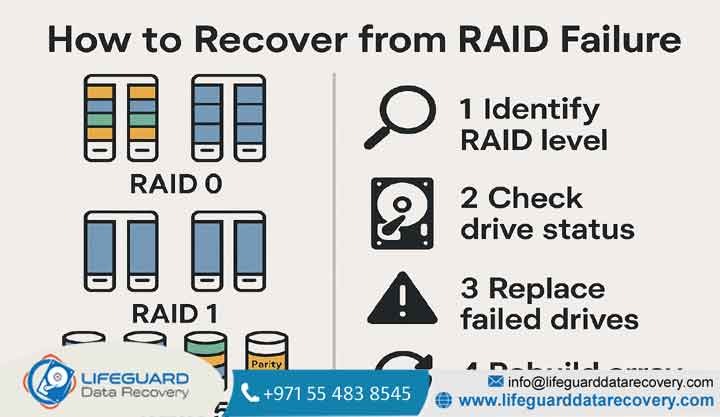
RAID 0 (Striped): Offers maximum speed but zero fault tolerance. Data is split evenly across all drives. If one disk drops offline, the remaining drive holds unusable fragments.
RAID 1 (Mirrored): High safety. Data is mirrored 1:1. If one drive fails, the other disk functions as an identical duplicate.
RAID 5 (Distributed Parity): Data and recovery parity blocks are striped across at least three drives. It tolerates a single drive loss.
RAID 6 (Dual Parity): High-end protection that safely allows up to two simultaneous disk failures before data loss occurs.
How to Recover Data from a Failed NAS RAID: 3 Step-by-Step NAS Recovery Solutions
If your array drops offline, running automated repair checkups on unstable disks is highly dangerous. Instead, follow a non-destructive protocol to isolate and recover your files safely.
Method 1: Rebuilding via Native Synology NAS RAID Recovery and QNAP Tools
If your NAS is healthy but a single drive has degraded, you can recover directly within the brand’s software overlayFor a Synology or QNAP device, power down the system immediately. Remove the failed drive and swap it for a brand-new disk of equal or greater capacity. Power the unit back on, log
into the web management portal, navigate to the Storage Manager, select your degraded pool, and click Repair Critical Warning: Never click “Repair” or “Initialize” if the system claims your remaining drives are unreadable or foreign. This will wipe the metadata and cause permanent data loss.
Method 2: Manually Mounting Drives Using a Linux Live Environment
If the NAS enclosure itself is completely dead, you can assemble the array manually on a desktop PC by booting into a temporary Linux environment.
Method 3: Utilizing Dedicated NAS RAID Data Recovery Process Applications
If you are uncomfortable navigating text-based Linux terminal configurations, third-party software applications can virtually piece your disks back together. Programs such as ReclaiMe Free RAID Recovery, UFS Explorer, or R-Studio read individual sector patterns across your connected drives. They can calculate the original block offsets and stripe sizes automatically, building a virtual replica of your file tree without making any destructive modifications to the physical source drives.
When to Bypass DIY and Contact a Professional RAID Recovery Service
DIY recovery apps work exceptionally well for resolving logical glitches, but they cannot fix physically damaged hardware. You must immediately disconnect your equipment and hand the drives over to an expert engineer if:
In these situations, running software tools will overheat and scar the internal platters, transforming a recoverable issue into irreversible data loss. Professional labs work inside Class 100 cleanrooms to safely swap out damaged read/write heads and read raw sectors directly.
Proactive Prevention Tips to Avoid Future NAS Storage Recovery Disasters
Recovering from a failure is stressful. Protecting your array from future issues requires a few simple adjustments to your environment
Frequently Asked Questions (NAS RAID Recovery)
Is data recovery after RAID 5 failure possible if two drives die simultaneously?
Yes, but it cannot be fixed natively by your NAS box. Because RAID 5 only features single-drive parity protection, losing two disks drops the volume into an unreadable state. Recovery requires using deep carving software or professional cleanrooms to temporarily fix the less-damaged drive, allowing engineers to reconstruct the missing blocks.
What are my options for a total RAID 0 NAS data recovery?
RAID 0 splits data fragments across all disks without any parity or mirroring. Because of this layout, if one disk undergoes a complete physical breakdown, the files are structurally incomplete. To save your data, the broken drive must be completely repaired in a physical laboratory to regain access to its raw sectors.
Can I expect a successful RAID 1 recovery after drive failure?
Yes, RAID 1 offers an exceptionally high recovery rate. Because it writes an exact 1:1 mirrored copy across your drives, a single drive failure leaves a fully functional, independent duplicate copy of your data on the remaining disk.
What sets dual-parity RAID 6 data recovery services apart from simpler fixes?
RAID 6 uses complex mathematical formulas across multiple drives to survive the loss of two disks at the same time. When a configuration breaks past this limit, standard utilities cannot parse the layout. Specialist labs use proprietary emulation software to manually map out the missing stripes and bypass the corrupted metadata layers.


